Network Cable Types and How to Choose the Right One
When discussing network infrastructure, the choice of cable is one of the factors that most impacts the performance, stability, and security of data transmission. Each category has its own characteristics, distance limitations, and specific applications. Understanding these differences is fundamental to building an efficient network, whether at home, in an office, or in large corporate environments.
1. Twisted Pair Cables (UTP and STP)
Twisted pair cables are the most commonly used in Ethernet networks. They can be divided into two main variations:
UTP – Unshielded Twisted Pair
- Most common and least expensive.
- Used in the majority of commercial and residential installations.
- Easy to handle, lightweight, and flexible.
- Recommended for environments with low EMI (Electromagnetic Interference).
STP – Shielded Twisted Pair
- Features internal metallic shielding.
- Ideal for environments with high EMI (Electromagnetic Interference): industries, machine rooms, areas near electrical cables.
- Better performance over long distances.
- Requires proper grounding of the rack (and patch panels) for the metallic shielding to work correctly and dissipate noise, preventing it from becoming a source of problems itself (such as ground loops).
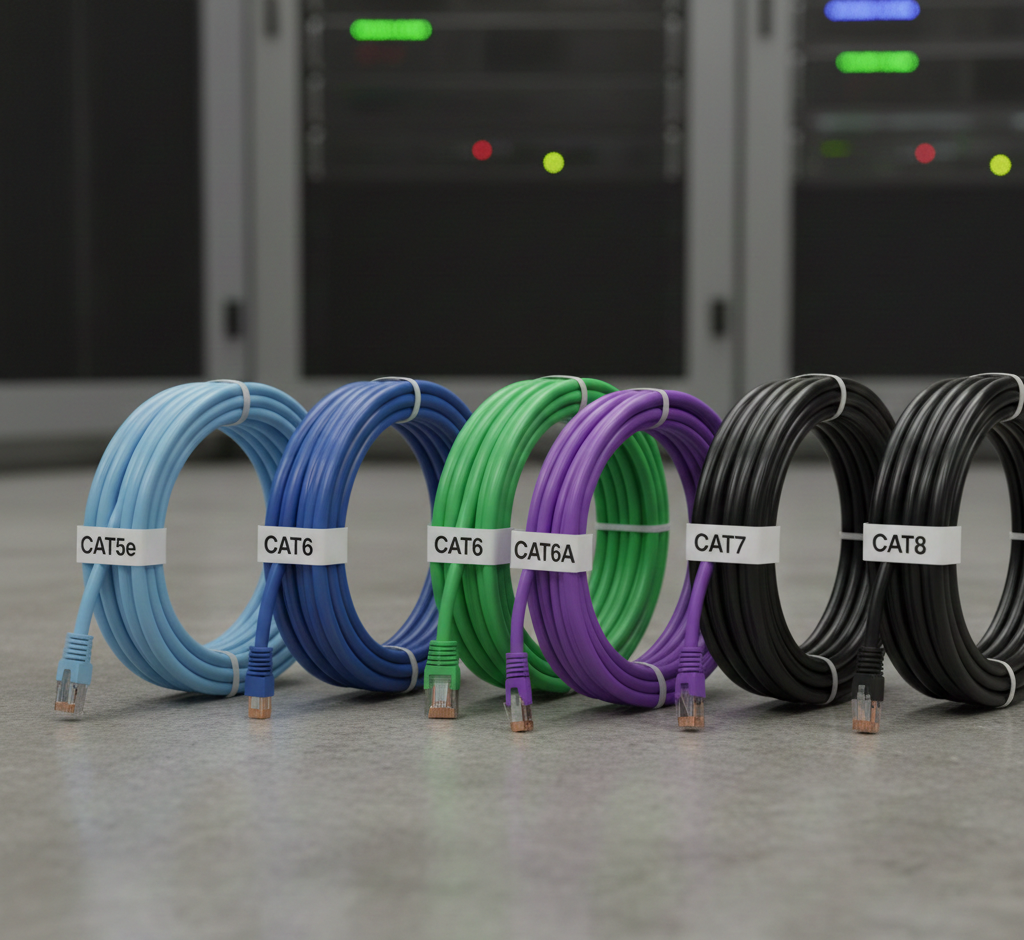
2. Network Cable Categories (Cat5e, Cat6, Cat6A, Cat7, and Cat8)
Each category defines the performance level, bandwidth, and supported speed.
Cat5e (Enhanced)
- Speed: Up to 1 Gb/s
- Frequency: 100 MHz
- Use: Homes, small offices
- Note: Low cost, still widely used.
Cat6
- Speed: Up to 10 Gb/s (up to 55 meters / 180 ft)
- Frequency: 250 MHz
- Note: Better insulation and reduced crosstalk. Ideal for corporate networks and modern structured cabling.
Cat6A (Augmented)
- Speed: 10 Gb/s guaranteed up to 100 meters (328 ft)
- Frequency: 500 MHz
- Use: Widely used in data centers.
- Note: Best price-performance ratio for professional projects.
Cat7
- Speed: 10 Gb/s to 40 Gb/s (depending on application and distance)
- Frequency: 600 MHz
- Note: Full shielding (SFTP). Less common in the US/Brazil and not officially recognized by TIA/EIA standards for general cabling.
Cat8
- Speed: Up to 40 Gb/s
- Frequency: 2,000 MHz
- Use: Data centers, racks, and short-distance connections.
- Note: Very expensive and completely unnecessary/overkill for residential use.
3. Copper Cables vs. Installation Environments
The choice changes according to the physical environment.
✔ Residential Environments
- Recommended: Cat6 UTP
- Reasons: Good price, supports up to 10Gb/s over short distances (up to 55 m), easy to install.
✔ Offices and Businesses
- Recommended: Cat6 or Cat6A UTP/STP
- Note: If there is significant electrical interference → use STP.
✔ Industries, Technical Rooms, and Motor Environments
- Recommended: Cat6A STP or SFTP
- Note: Cables with reinforced insulation/jackets.
✔ External Installation (Outdoors)
- Use specific cables: Outdoor network cable (PE jacket + internal gel/flooding).
- Note: Resistant to UV rays, water, and temperature variations.
- Attention: If the infrastructure is well-protected (rigid conduits), standard indoor cables (Cat6/Cat6A) can be used outdoors, provided the conduit strictly prevents contact with water and sun.
4. Solid Core Cable vs. Patch Cord
Solid Core Cable (Rigid) Also known as solid conductor cable (thicker conductor wire), it is designed specifically for permanent structured cabling installations.
- Used in fixed infrastructure (inside cable trays, conduits, and walls).
- Better performance over long distances.
- Must always terminate in a patch panel or keystone jack.
Patch Cord (Stranded/Flexible) Used for short connections requiring flexibility (e.g., PC → Wall Outlet, or Patch Panel → Switch in the rack).
- Should not be used as infrastructure cable (fixed horizontal cabling) inside walls or conduits.
- The total combined distance of patch cords (in the rack and work area) should not exceed 10 meters (33 ft), as the total channel distance (solid cable + flexible cables) is limited to 100 meters.
- Note: The 5-meter limit is a recommended practice for short patch cables within the rack.
5. Maximum Cable Length
For copper Ethernet cables (UTP/STP), the standard is:
- 100 meters per link (90 m of solid cable + 10 m of patch cords).
Exceeding this results in signal loss, bandwidth drops, and transmission errors. If you need to go further:
- Use an intermediate switch,
- Migrate to fiber optics,
- Or install Ethernet extenders (less recommended).
6. How to Choose the Right Cable (Step-by-Step)
1. What is the desired network speed?
- Up to 1 Gb/s → Cat5e or Cat6
- 10 Gb/s → Cat6A recommended
- Above 10 Gb/s → Cat7 or Cat8 (rare cases)
2. What is the installation environment?
- Residential → Cat6 UTP
- High electrical noise → STP
- Industrial → Reinforced STP/SFTP
- Outdoor → PE cable with gel or Cat6/Cat6A with sealed conduit
3. What is the maximum distance?
- Up to 100 m → Copper works
- Over 100 m → Fiber optics is mandatory
4. Do you need PoE (Power over Ethernet)?
- Cat6A has better efficiency for PoE+ and PoE++.
- Inferior cables (lower gauge) may heat up if the load is high.
7. When to Choose Fiber Optics Over Network Cable?
Use fiber when:
- Distances exceed 100 meters.
- Backbones between floors or buildings.
- High immunity to interference is needed.
- Speeds of 10 Gb/s or higher are required.
- Critical networks (airports, hospitals, data centers).
Fiber does not suffer from EMI (Electromagnetic Interference) and has a range of kilometers.
Final Thoughts
Choosing the ideal network cable depends on three main factors: network speed, installation environment, and path distance.
For most current projects, Cat6A offers the best long-term investment. However, for specific environments such as industrial, outdoor, or mission-critical areas, shielded cables and fiber optics are the safer, professional choice.